ESP32-AGENT
-DASHBOARD
A PHYSICAL SURFACE FOR AI CODING AGENTS —
CLAUDE CODE / CODEX / CURSOR / MULTI-AGENT
SIGNAL: HOOK → BRIDGE → USB SERIAL → PANEL
STATUS: FIELD OPERATION — ACTIVE
FW LINE: V7.8 · LVGL 9 · ESP-IDF 6
LICENSE: MIT — ALL WORK IS OUR OWN
--:--

DEPLOYGITHUB ↗

It tells you when it's your turn.

Your agents run in terminals you aren't watching. The expensive failure isn't a slow model — it's a finished one you don't notice. This 2.16″ AMOLED unit sits beside your keyboard and turns gold the moment an agent hands the turn back. Until then: a clock, the weather, a quiet ring.

live reconstruction — open the full 1:1 simulator ↗

UNIT: DESK-SIDE FIELD PANEL GLASS: 480×480 AMOLED — MEASURED, NOT SPEC'D KEYS: 3 PHYSICAL COST: ~US$30 STATE: GOLD = YOUR MOVE

01 / Signal Path

Everything on the device is ambience except this chain. A hook fires when your agent stops, a resident bridge folds it into one state snapshot, one line of JSON crosses the USB serial link, and the panel pulls itself to the gold pose — one-shot, only on a fresh signal, never for stale state. Key away and it stays away for that round.

Agent stops

hook_dispatch.py stop

Bridge folds state

claude_buddy_bridge.py

One line of JSON

dash snapshot {"agents":[…]}

Panel turns gold

接着来 · your move

The bridge is self-healing: hooks auto-start it, port loss is detected in under a second, every reconnect force-pushes config, time and the full snapshot. If the host goes silent the panel says so and retreats to the clock — it never freezes with a stale promise on screen.


02 / State Contract

Colour is state,
never décor.

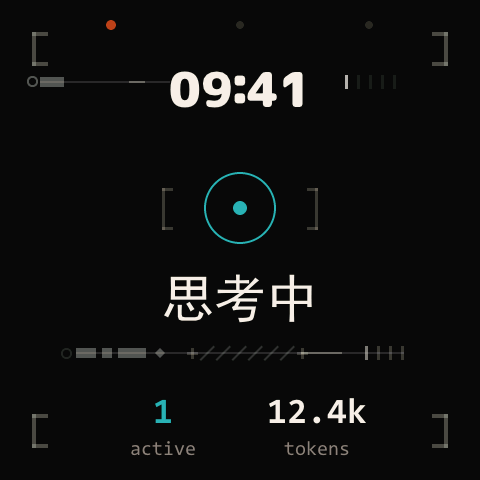
One breathing ring is the only status glyph on the device, and its colour is a device-wide contract. No icon zoo, no badge counts — a glance from a metre away is the entire interface.
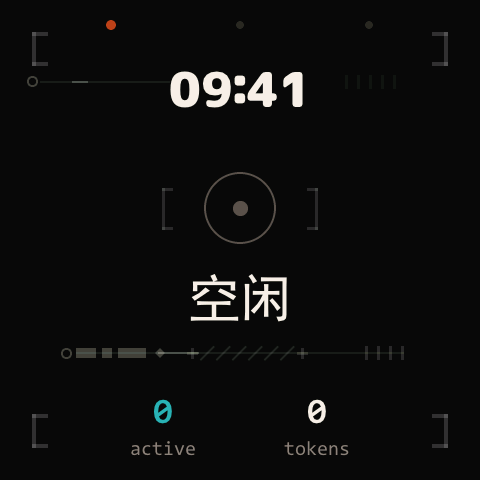
Dashboard, idle: dim ring, the word 空闲
DIM — NOTHING NEEDS YOU 空闲
Dashboard, thinking: teal ring, the word 思考中
TEAL — AGENT WORKING 思考中
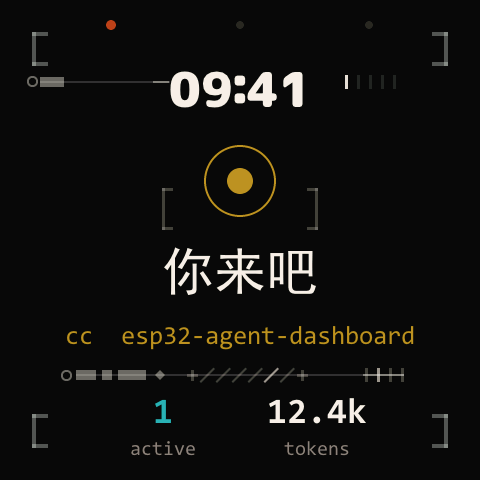
Dashboard, your turn: gold ring, a greeting word, project chip
GOLD — YOUR MOVE 该你了

The decoration layer is held to the same rule: its brackets, ticks and arcs never take a colour of their own. When an agent hands the turn back, only their tempo rises.
03 / Views & Keys

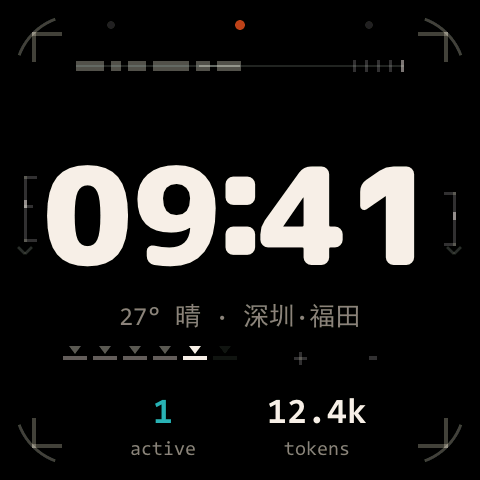
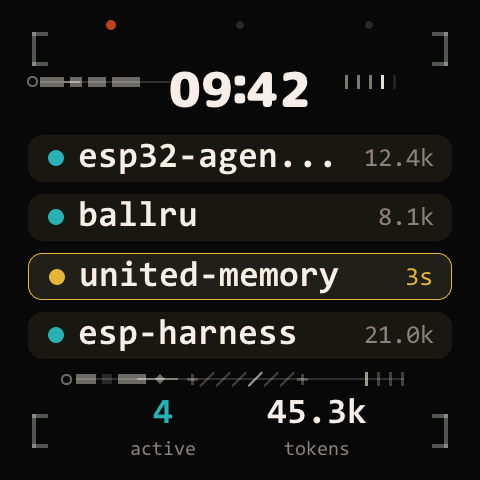
No menus, no modes, no gestures. Three physical keys map to three views, one each; pressing the key of the view you're already on just flashes the frame. With two to four agents the dashboard becomes a fleet — waiting rows carry the gold.

Clock view: large 09:41, weather line, active and token footer
PWRCLOCK — HOST-SYNCED, RETREAT VIEW
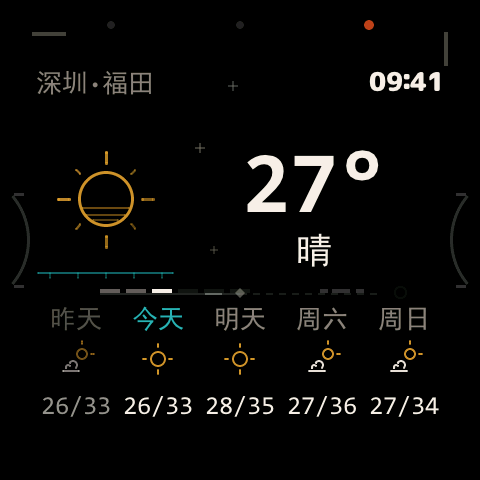
Weather view: 27 degrees, sunny, five-day strip for Shenzhen Futian
USERWEATHER — BRIDGE-PUSHED, 5-DAY
Fleet view: four project rows, one waiting row highlighted gold
BOOTFLEET — 4 AGENTS, ONE WAITING

04 / Field Record

Built by
measuring.

Screenshots lie and timers lie, so every claim gets an instrument: windowed render timing on-device (?perf), a transition benchmark with a committed baseline that fails on regression, a negative-space audit for the decoration layer, and a ledger of optimisations that made things worse — kept on file so they never get retried.

Weather transitions−27% render

Vector scenes pre-composited to bitmaps at rest — transition frames blit instead of re-rasterising ~90 objects. Idle repaint −53%.

Motion sampling30 → 60 Hz

LVGL's anim timer never followed the raised refresh tier; syncing them cut per-frame dirty unions and raised drawn frames 15–35%.

Decoration layer+7% ceiling

The full mechanical-ornament layer, entrance deferred until actors land; holds the 66 ms idle tier at rest. First cut cost +58% — measured, redesigned.

Panel geometry466 → 480

The spec sheet said 466×466; on-device edge rulers (?vis) proved all 480×480 visible, corner radius 76 — and exposed a 7 px centring error every layout had inherited.

Springsζ 0.68 / 0.92

Damped harmonic oscillator LUTs, not easing presets. The clock morphs through font rungs across every scene change; shared elements recognise each other and hold still.

Dead ends3 on file

A second draw unit, full-screen coalescing, sprite-baking the ambient cluster — all "obviously right", all measured slower, all documented where they died.


05 / Decommissioned

Earlier versions did more, on purpose. A panel you must operate is just another terminal — what survived is an attention machine.


06 / Deployment

Build
one.

# toolkit: build / flash / console / screenshot
git clone https://github.com/Caldis/esp-harness
pip install -e esp-harness/tools/esp-harness/

git clone https://github.com/Caldis/esp32-agent-dashboard
cd esp32-agent-dashboard

esp-harness build --project .
esp-harness flash --project . --port COM9

# the bridge (hooks auto-start it afterwards)
python tools/claude_buddy_bridge.py serve \
       --port-kind serial --port COM9

# no board? the tokeniser-exact mock runs everything but the glass
python tools/mock_device_v1.py --port 9876 -v
BOARD: WAVESHARE ESP32-S3-TOUCH-AMOLED-2.16
GLASS: 480×480 AMOLED · CORNER R=76
LINK: USB-C SERIAL · ESP-IDF V6 · LVGL 9
REQ: PYTHON 3.10+ · ~US$30

Then point Claude Code's hooks at tools/hook_dispatch.py — six events, one line each. The dispatcher auto-starts the bridge and circuit-breaks on timeouts, so a dead bridge can never stall your session. Codex goes through codex_wrapper.py. Full wiring in the README.